Getting started
Location tracking, routing, and navigation for iOS.
Overview
The Wemap SDKs provide comprehensive location, routing, and navigation capabilities for iOS apps. They are distributed as several frameworks that share a single session:
- WemapCoreSDK — common types and the foundation for all other SDKs (API access, routing, POIs).
- WemapMapSDK — customizable, interactive maps built on MapLibre.
- WemapGeoARSDK — augmented-reality navigation and points of interest.
- WemapPositioningSDK — indoor/outdoor positioning:
- VPS — visual positioning system, camera-based (best for indoor).
- GPS — global positioning system (best for outdoor).
Each framework has its own reference and getting-started guide — see the Frameworks list below.
Upgrading from 0.x
v1 is a breaking release. migration guide walks through it in twelve steps, each of which leaves your project compiling, and ends with an index from compiler error to step number.
Requirements
| Wemap SDK | Xcode | Swift | iOS |
|---|---|---|---|
| 1.x | 26.0+ | 6.2+ | 15.0+ |
The SDKs ship as binary XCFrameworks. A binary Swift framework can only be consumed by the toolchain that built it and newer, so Xcode 26.0 / Swift 6.2 is the minimum — earlier Xcode versions cannot build against the binaries.
Installation
Add the SDK as a dependency via Swift Package Manager or CocoaPods.
Important: v1 ships as a pre-release first —
1.0.0-beta.N. A pre-release is invisible to a version range: neither Up to Next Minor/Major Version in Xcode norpod '~> 1.0'will ever resolve it, so you cannot upgrade into the beta by accident and you cannot stay on it by accident either. To use a beta, pin the exact version — Exact Version in Xcode, or:The public API can still change between betas. Switch to a dependency rule once
1.0.0is out.
Swift Package Manager
-
In Xcode, choose
File > Add Package Dependencies…. -
Enter the URL
https://github.com/wemap/wemap-sdk-ios-distribution. -
Choose a dependency rule (we recommend Up to Next Minor Version from the latest release).
-
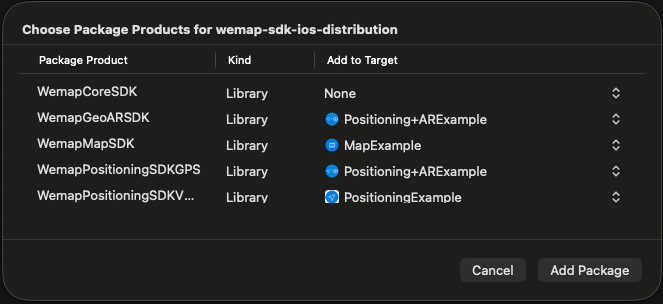
Add the package to your app target.
CocoaPods
use_frameworks!

target 'YourApp' do
    pod 'WemapMapSDK', '<version>'                    # interactive maps
    pod 'WemapGeoARSDK', '<version>'                  # AR navigation
    pod 'WemapPositioningSDK/VPSARKit', '<version>'   # VPS (indoor)
    pod 'WemapPositioningSDK/GPS', '<version>'        # GPS (outdoor)
end
Creating a session
Every Wemap SDK is driven by a session, which loads a map's data once and owns the shared state the
SDKs build on (routing, POIs, positioning). Create one session and pass it to each component you
use. You need a mapID and a token — contact the Wemap team.
import WemapCoreSDK

// CoreSDK alone (API access, no rendering):
let session = try await CoreSession(mapID: 19158, token: "YOUR_TOKEN", config: SessionConfig(environment: .prod))
import WemapMapSDK

// Map rendering — create a MapSession and pass it to a MapView:
let session = try await MapSession(mapID: 19158, token: "YOUR_TOKEN")
let mapView = MapView(frame: view.bounds, session: session, config: MapViewConfig())
The same session can be passed to positioning sources and the AR view, keeping routing, POIs, and user location consistent across every SDK.
Examples
For sample implementations, see the official sample-apps repository.
Topics
Frameworks
- WemapCoreSDK API reference
- WemapMapSDK API reference
- WemapGeoARSDK API reference
- VPS API reference
- GPS API reference