Getting started
The Wemap SDKs provide comprehensive location tracking, routing, and navigation capabilities for mobile applications. This guide will help you get started with the SDKs, focusing on the positioning package.
Overview
The Wemap SDKs are organized into several frameworks:
- WemapCoreSDK: Common types, foundation for all other SDKs
- WemapPositioningSDK: Location tracking and positioning
- WemapMapSDK: Custom interactive maps
- WemapGeoARSDK: Routing and navigation in AR
Requirements
Different Wemap SDKs have different requirements, but these are the common requirements applied to all of them.
- iOS 13 or newer
- Xcode 26.0 or newer
- Swift 5.9 or newer
Installation
Before you start developing your application with WemapSDKs, you need to add the SDK as a dependency.
Adding the Dependency
To add WemapSDKs to your app:
- Swift Package Manager
- CocoaPods
- In your Xcode project or workspace, click on
File > Add Packages Dependencies... - Paste the following GitHub URL into the search bar in the top right corner: https://github.com/wemap/wemap-sdk-ios-distribution
- Select the
Dependency Ruleyou want to apply to the Wemap SDKs- We recommend selecting
Up to Next Minor Versionfor theDependency Rule, specifying the latest version (ex.: 0.28.0) as the minimum version. This allows you to select the most recently released stable patch version of the SDKs.
- We recommend selecting
- Click on
Add Package. - In the new window, click on the dropdown
Add to Targetand select your project target.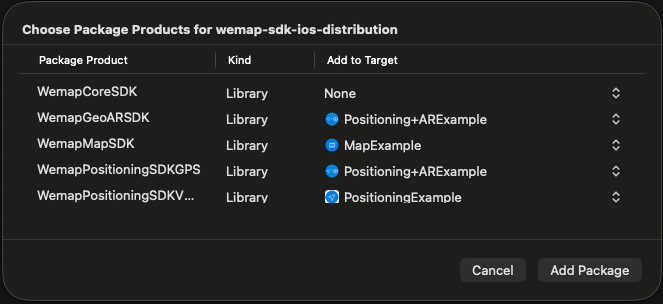
- Click
Add Package. - Verify that you can
import WemapMapSDK(or any other WemapSDK) in your app.
-
Add dependencies in the
PodfileAdd the required WemapSDK pods to your app:
use_frameworks!target 'TargetNameOfYourApp' do# to use Wemap custom interactive mapspod 'WemapMapSDK', '<version>'# to use Wemap GeoAR for navigationpod 'WemapGeoARSDK', '<version>'# to use Wemap positioning systempod 'WemapPositioningSDK/VPSARKit', '<version>' # Wemap VPS ARKit Location Source (best for indoor)pod 'WemapPositioningSDK/GPS', '<version>' # GPS Location Source (best for outdoor)end -
Ensure minimum iOS version
Your project must target iOS 13.0 or later:
platform :ios, '13.0' -
Install dependencies and open the project
Run the following command to install the pods:
pod install --repo-updateThen, open your project in Xcode:
open your-project.xcworkspace
Fetching MapData
MapData is a configuration object crucial for any WemapSDK initialization.
You must have a mapID and token to request this object.
For more details, please contact the Wemap team.
Below there are examples of how to fetch MapData object using different SDKs.
WemapPositioningSDK or WemapCoreSDK
ServiceFactory
    .getMapService()
    .map(byID: 19158, token: "GUHTU6TYAWWQHUSR5Z5JZNMXX") // Specify your mapID and token here
    .receive(on: DispatchQueue.main)
    .sink(receiveCompletion: {
        if case let .failure(error) = $0 {
            debugPrint("Failed to get map data with error - \(error)")
        }
    }, receiveValue: { mapData in
         // now you have MapData and can use it to continue with any WemapSDK
    })
    .store(in: &cancellables)
WemapMapSDK
WemapMap.shared
    .getMapData(mapID: 19158, token: "GUHTU6TYAWWQHUSR5Z5JZNMXX") // Specify your mapID and token here
    .sink(receiveCompletion: {
        if case let .failure(error) = $0 {
            debugPrint("Failed to get map data with error - \(error)")
        }
    }, receiveValue: { [self] mapData in
        // now you have MapData and can use it to continue with any WemapSDK
    })
    .store(in: &cancellables)
Examples
For additional examples and sample implementations of WemapSDKs, visit the official GitHub repository.
Clone the repository and follow the README instructions to run the sample application.